Hey guys, I have written this article for the sole purpose of informing you that the Nvidia GeForce FX 5500 will not work in ubuntu with unity. It's better for you to upgrade your system or find a mirror for the old versions of Ubuntu.
If you have decided to download an older version of the Ubuntu operating system. You can download the old releases here. For installing the driver, you can read my post about installing GeForce FX5500 driver in ubuntu.
But if you still want to install the latest ubuntu release, then you need to ready yourself for an upgrade. Yeah, you can still run ubuntu in 512mb ram and atleast 1Ghz of CPU power but with the latest releases of Ubuntu, you will need a slightly better video card for your machine. For a technical reference, please refer here.
Showing posts with label Computer Tweaks. Show all posts
Showing posts with label Computer Tweaks. Show all posts
Thursday, February 28, 2013


Friday, September 9, 2011
How to install Nvidia GeForce FX 5500 driver in ubuntu (offline)
It's been a while when I last wrote here in my blog. I want to say sorry because I am busy with my studies. Well, I want to share with you all on how to install Nvidia GeForce FX 5500 driver in ubuntu offline. As far as I know, not only the FX5500 can be installed in this way.
There are two ways on how to instal Nvidia GeForce FX 5500 driver. One is using the Ubuntu software solution. Just search for nvidia. It will show a list of software/packages that you can download and install in your computer. The alternative way is to download the driver from the nvidia website and install it locally.
To start, download the latest driver for your nvidia from the nvidia website. It will be ended with a .run.
Tip: click here to go to the download page for Nvidia driver for linux 32 bit.
After you downloaded the driver, paste it on the desktop for easy look up.
There are two ways on how to instal Nvidia GeForce FX 5500 driver. One is using the Ubuntu software solution. Just search for nvidia. It will show a list of software/packages that you can download and install in your computer. The alternative way is to download the driver from the nvidia website and install it locally.
To start, download the latest driver for your nvidia from the nvidia website. It will be ended with a .run.
Tip: click here to go to the download page for Nvidia driver for linux 32 bit.
After you downloaded the driver, paste it on the desktop for easy look up.
Saturday, January 22, 2011
Ubuntu: The best for people who are Social Network Fanatic
Yeah! You heard it right. Ubuntu is the best operating system for people who are very into Social Networking and also for chatting. Ubuntu gives you a very simple and organized chat inter phase.
Chats that it supports:
Social Networks:


Chats that it supports:
- Facebook Chat
- Google talk
- Jabber
- AIM
- Gadugadu
- ICQ
- MSN
- Myspace
- and many more..
Social Networks:
- Friend feed
- Buzz
- Flickr
- StatusNet
- and many more...


Friday, January 21, 2011
Shutdown you computer with the command prompt
Is there anyone there interested to do something with the command prompt? Here is a simple trick using the command prompt to Shutdown, Log off or Restart your computer and the best trick here is that you can put a timer when will it shutdown, Log off or Restart.
Example code: This is inputed with the command prompt but you can input this code also in the "run" located at the start menu.
Example code: This is inputed with the command prompt but you can input this code also in the "run" located at the start menu.
//this will shutdown your computer
shutdown -s
//this will restart your computer
shutdown -r
//this will log off your computer
shutdown -l
//Setting shutdown, restart, log off countdown timer.
//just add -t xx
//the xx is the number of seconds before the computer will shutdown
//for example
shutdown -s -t 180
//this code will make your computer shutdown when the countdown timer finished counting off 3 minutes(180seconds)
//Sometimes there are processes that need to force to shutdown so we need to add -f with the code
shutdown -s -t 180 -f
//When you set a shutdown command, there will a window that will pop-out. You can't close and cancel the shutdown command unless you will input.
shutdown -a
//this will cancel the shutdown command for you
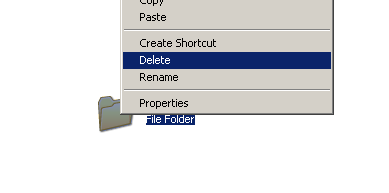
How to delete a file in use in Xp, Vista and Window7 - Unlocker Assistant
Do you ever experienced this? A file that cannot be deleted? It's possibly locked because a process still uses that file or a specific file in a folder. You can usually close or end the process that could possibly causes the lock down of that file. But sometimes, you can't find or locate the specific process to end or close.
This is a sample that file in a folder is being used.


This the window that will pop-out if a file is still being used when you try to delete it.

This is a sample that file in a folder is being used.

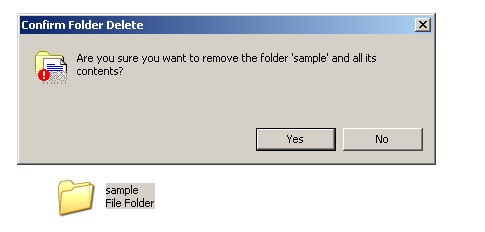
This the window that will pop-out if a file is still being used when you try to delete it.

Thursday, January 20, 2011
Orbit - media downloader
Many of us really like to download videos, images and music files but we don't know what media downloader will you use. If you are one of the people who are very into downloading media files from the net, Orbit is the application for you. This media downloader does't download media files only but it is also a all around download, but it is really made for downloading media files.
Here is some images of Orbit:


You can download the installer of Orbit here.
If you want to subscribe, feel free to submit your email for free updates of my blog. I will greatly appreciate it.
Here is some images of Orbit:
You can download the installer of Orbit here.
If you want to subscribe, feel free to submit your email for free updates of my blog. I will greatly appreciate it.
Tuesday, January 11, 2011
Fresh installed Ubuntu 10.10 Maverick
Hey there, I just finished installing my Ubuntu 10.10 on my desktop. Yeahey!. It looks like this. :)


Saturday, January 8, 2011
7-zip file compressing software
Do you want to have a file compressing software that can unpack certain file type like tar et. al. Then 7-zip is the one for you.
7-Zip is open source software. Most of the source code is under the GNU LGPL license. The unRAR code is under a mixed license: GNU LGPL + unRAR restrictions.
7-Zip works in Windows 7 / Vista / XP / 2008 / 2003 / 2000 / NT / ME / 98. There is a port of the command line version to Linux/Unix.
 |
Copying and moving solution - TeraCopy
We all know that we always use copy and cut option when copying and moving files from one place to another. But sometimes the copying and moving the files are taking so long to finish. That's because the computer that you are using is not using its full power or potential to copy and move files. To fully use the copying and moving potential of your computer, I suggest to use TeraCopy.
 |
| TeraCopy by Code Sector |
Friday, January 7, 2011
Video Download Helper
Guys this will be a quick and short post. I want to share to all of you a add-on in Firefox that helps you download video stream in video site or any sites that has a video stream. The add-on is called Video Download Helper, you can search it in Google or in Firefox add-ons. This is a helpful add-on and the best is that you download the video like any other file in the world wide web. So try Video Download Helper. Any comments and suggestion. Kindly post comments bellow.
Wednesday, January 5, 2011

100% Free download manager - Gigaget
I'm sure all of us usually download files from the world wide web. But some of us don't have a stable internet connection. So we user a external software to download files from the net. Like download manager.
A download manager is a computer program dedicated to the task of downloading (and sometimes uploading) possibly unrelated stand-alone files from (and sometimes to) the Internet for storage.
 There are so many download manager out therein the world wide web but the only problem is that all softwares today are usually must be bought first before you can use it. So we all rely with open-source programs or freeware.
A download manager is a computer program dedicated to the task of downloading (and sometimes uploading) possibly unrelated stand-alone files from (and sometimes to) the Internet for storage.
 There are so many download manager out therein the world wide web but the only problem is that all softwares today are usually must be bought first before you can use it. So we all rely with open-source programs or freeware.
 Sunday, January 2, 2011
Photo editor
FotoSketcher is a freeware photo editor can help you edit your photos into art like sketches, paintings and other types of art. FotoSketcher also a very friendly software that anybody can understand and learn in a very short time. If you like to edit photos but don't like to stay in front of the computer for a very long time then FotoSketcher is the one for you!
Here is a sample snapshot of fotosketcher.

Download fotosketcher: Click here to download fotosketcher
Here is a sample snapshot of fotosketcher.

Download fotosketcher: Click here to download fotosketcher
Thursday, July 1, 2010
E-booster

NOTE: I recommend this to users who cannot afford to buy ram for there PC and LAPTOP. This is not a free application but it can help you when you need some extra memory for your computers.
Friday, March 26, 2010
PICASA

PICASA is a great picture manager but from being a great picture manager, it is one of the cheapest software in town because IT IS FREE. Yes, it is free. You can download PICASA from picasa.google.com.
Add some twist with CursorXp or CursorFx

Yeah. Put some magic into your old boring cursors with CursorXP or CursorFX. It manages your cursor themes and let you customize it further.
Thursday, March 25, 2010
The best theme for Vista Fans
Maybe most of you guys already know about this tweak for your Window XP computers. This is the Vista Inspirat theme by crystalXp.net. It is the best theme for vista fans that can't leave there beloved Window Xp.


You can download the theme at www.crystalxp.net for free.
Here some pics of the Vista Inspirat Theme.


Subscribe to:
Posts (Atom)